
问题定位
正常情况下,我们正确配置iro主题设置的steamID和API后(配置教程:Steam库模版使用帮助 | Fuukei 周边文档),模板页面即可生效,但由于我们在搭建博客网站时所选择的服务器的不同,可能存在服务器无法访问Steam API的问题(国内虚拟主机常见问题)。
假如在生效的博客steam页面按F12打开开发者工具,切换到"网络(Network)"标签页,使用筛选器筛选steam,就可以看到steam游戏封面图片链接来自特定的CDN域名,成功的从steamAPI获取了完整的游戏数据,如下图所示:
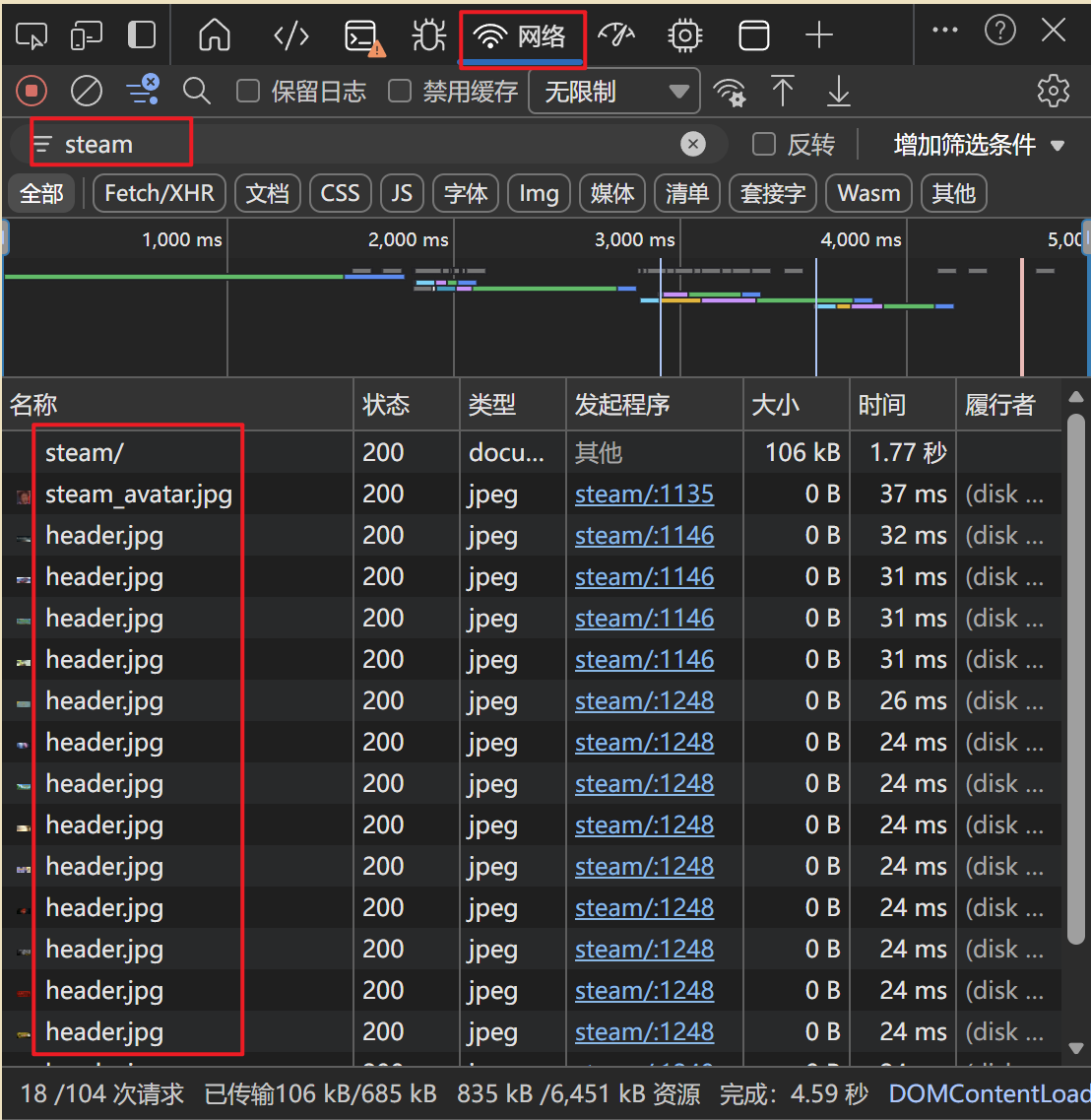
如果发现面板中没有Steam CDN的请求,那么极有可能Steam数据根本没有被获取或缓存。
排查步骤
第一步:在WordPress后台检查iro主题的模板设置,确认API配置是否正确
第二步:测试API是否能访问
在控制面板的文件管理器创建 steam_test.php 放在网站根目录(wwwroot):
点击查看详情代码
<?php
header('Content-Type: text/html; charset=utf-8');

$api_key = '你的API_KEY'; // 替换
$steam_id = '你的64位ID'; // 替换

echo "<h3>Steam API 连通性测试</h3>";

$url = "https://api.steampowered.com/IPlayerService/GetOwnedGames/v0001/?key={$api_key}&steamid={$steam_id}&include_appinfo=1&format=json";

$ch = curl_init();
curl_setopt($ch, CURLOPT_URL, $url);
curl_setopt($ch, CURLOPT_RETURNTRANSFER, true);
curl_setopt($ch, CURLOPT_TIMEOUT, 15);
curl_setopt($ch, CURLOPT_SSL_VERIFYPEER, false);
$response = curl_exec($ch);
$http_code = curl_getinfo($ch, CURLINFO_HTTP_CODE);
$error = curl_error($ch);
curl_close($ch);

echo "HTTP状态码: {$http_code}<br>";

if ($error) {
    echo "❌ CURL错误: {$error}<br>";
    echo "<b>结论:服务器无法访问Steam API</b>";
} elseif ($http_code == 200) {
    $data = json_decode($response, true);
    $count = $data['response']['game_count'] ?? 0;
    echo "✅ API连接成功<br>";
    echo "游戏数量: {$count}<br>";
    if ($count > 0) {
        echo "前3个游戏:<br>";
        foreach (array_slice($data['response']['games'], 0, 3) as $game) {
            echo "- {$game['name']}<br>";
        }
    }
} else {
    echo "❌ 请求失败,响应: " . substr($response, 0, 500);
}
?>访问你的域名/steam_test.php,如果显示结果如下:
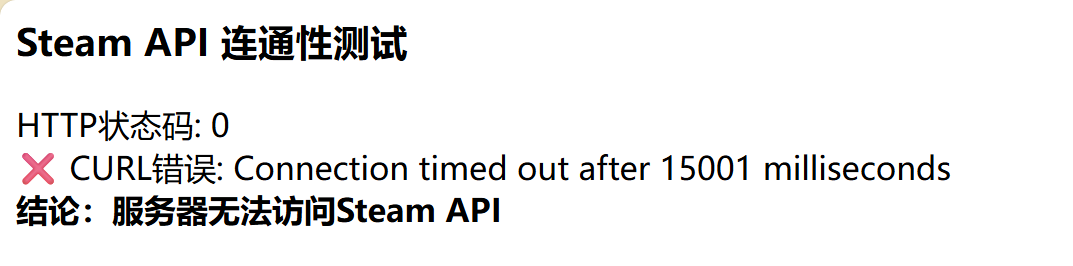
那么可以确认问题是服务器无法访问Steam API(测试完成即可删除文件)
解决方案
一、手动填入预设数据
既然服务器访问不了,我们就用主题提供的"预设响应内容"功能。
第一步:在电脑浏览器上获取数据
在地址栏输入以下链接(替换成你的信息):
访问成功,则会显示一大段类似的内容,全选复制此段内容:
{"response":{"game_count":123,"games":[{"appid":730,"name":"Counter-Strike 2"...如果你电脑也打不开那个链接
可能的原因:
- API Key错误 - 重新检查
- Steam资料不是公开的 - 去Steam设置里把游戏详情改为公开
- 需要科学上网 - 有些地区直接访问Steam API也有问题
第二步:填入主题设置
进入WordPress后台找到相关设置,在Steam库模板设置处开启"使用缓存或预设响应内容",并点击“点击此处管理缓存设置”,如下图所示:
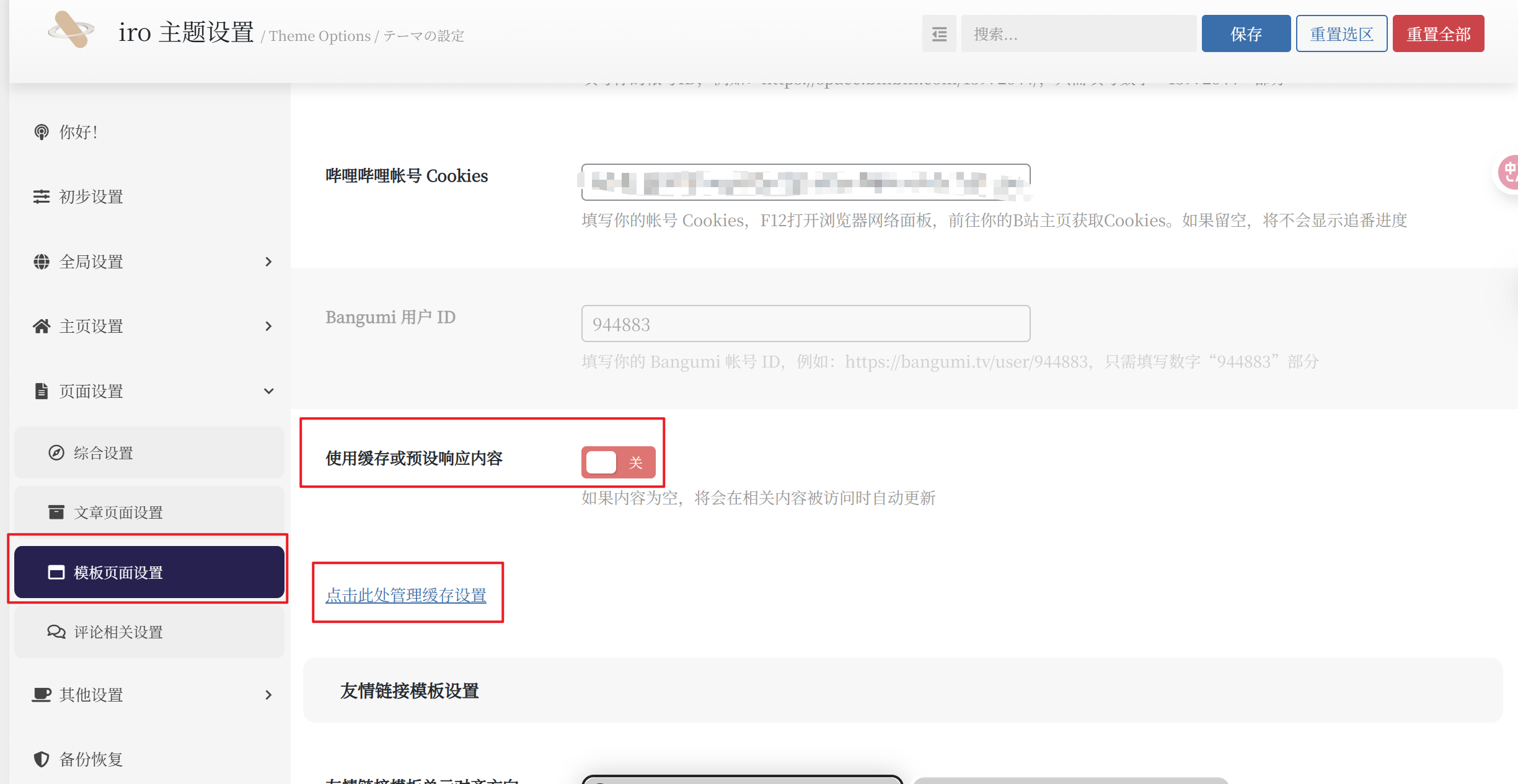
把刚才复制的JSON数据粘贴在Steam缓存,保存更改。
第三步:测试
访问你的Steam模板页面,看是否能显示游戏了。
说明:
如果你突然发现,Steam页面中并没有完全显示你的游戏,放心,这不是你的问题。有的游戏API是不会返回的。常见原因如下:
| 原因 | 说明 |
|---|---|
| 游戏没有封面图 | 一些小游戏没有header图片 |
| 免费游戏被过滤 | API可能不返回某些免费游戏(如Apex) |
| API返回数量限制 | 默认可能有数量上限 |
| 游戏库隐私设置 | Steam隐私设置影响 |
| 免费DLC/工具,可能被API过滤 | 例如tmodloader等可下载内容(DLC) |
手动添加缺失游戏:
Steam游戏缓存JSON格式如下:
{
    "response": {
        "game_count": 游戏总数,
        "games": [
            { 游戏1 },
            { 游戏2 },
            { 游戏3 }
        ]
    }
}
单个游戏的格式(以Apex为例):
{
    "appid": 1172470,
    "name": "Apex Legends",
    "playtime_forever": 23616,
    "img_icon_url": "39badb3f69a2e2f0c981e8a7a66c78e9c7f2b9d2",
    "has_community_visible_stats": true,
    "playtime_windows_forever": 23616,
    "playtime_mac_forever": 0,
    "playtime_linux_forever": 0,
    "playtime_deck_forever": 0,
    "rtime_last_played": 1753795873,
    "playtime_disconnected": 0
}
字段说明:
| 字段 | 说明 | 如何获取 |
|---|---|---|
appid | Steam游戏ID | 商店页面URL中的数字,如 store.steampowered.com/app/1172470 |
name | 游戏名称 | 直接填写 |
playtime_forever | 总时长(分钟) | 小时数 × 60 |
img_icon_url | 图标哈希 | 填40个任意字符即可 |
playtime_windows_forever | Windows时长 | 通常与总时长相同 |
rtime_last_played | 最后游玩时间 | Unix时间戳,可填当前时间 |
其他 playtime_* | 其他平台时长 | 填0 |
添加步骤:
第一步:在Steam 商店页面复制 URL并计算时长
第二步:在 games 数组末尾添加
在最后一个 } 后加逗号,然后添加新游戏:
            ...最后一个游戏
        },
        {
            "appid": 新游戏ID,
            "name": "新游戏名称",
            "playtime_forever": 分钟数,
            "img_icon_url": "0000000000000000000000000000000000000000",
            "has_community_visible_stats": true,
            "playtime_windows_forever": 分钟数,
            "playtime_mac_forever": 0,
            "playtime_linux_forever": 0,
            "playtime_deck_forever": 0,
            "rtime_last_played": 1753795873,
            "playtime_disconnected": 0
        }
    ]
}
第三步:更新 game_count
把开头的 "game_count": 14 改成实际数量。
二、进阶方案:把资料卡片整合到主题页面
虽然通过上述方案可以间接解决服务器无法访问Steam API的问题,但仍存在一些劣势:
- 手动缓存:需要定期手动更新 JSON 文件
- 无自动同步:无法连接到 Steam API 实时获取数据
- 缺失部分信息展示:无法显示 Steam 头像、在线状态等
由于Steam API 被墙,我暂时无法通过更新脚本实现定时更新游戏库数据,但我们可以在网站根目录创建文件来展示Steam个人资料
第一步:在浏览器获取Steam个人信息,创建steam_profile_preset.json
在地址栏输入以下链接:
https://api.steampowered.com/ISteamUser/GetPlayerSummaries/v0002/?key=你的API密钥&steamids=你的64位ID
将会出现以下内容:
{"response":{"players":[{"steamid":"你的ID","personaname":"你的昵称","avatarfull":"https://avatars.steamstatic.com/xxx_full.jpg","profileurl":"https://steamcommunity.com/profiles/xxx/","personastate":1}]}}在网站根目录创建steam_profile_preset.json,并将以上内容复制进去。
因为Steam头像服务器 avatars.steamstatic.com 在国内访问不稳定,建议将头像上传到服务器(也可以上传到个人图床,只需修改短代码中的头像区即可)。在浏览器直接打开JSON里的头像链接,比如:
https://avatars.steamstatic.com/xxx_full.jpg
右键 → 另存为 → 保存到电脑,上传到文件根目录,重命名为 steam_avatar.jpg。
第二步:创建短代码文件
在网站根目录创建 steam-card-shortcode.php(头像代码区记得修改):
点击查看详情代码
<?php
/**
 * Steam 资料卡片短代码
 * 使用方法: [steam_card]
 */

// 防止直接访问
if (!defined('ABSPATH')) {
    exit;
}

// 注册短代码
add_shortcode('steam_card', 'render_steam_card');

function render_steam_card($atts) {
    // 短代码参数(可选)
    $atts = shortcode_atts([
        'show_games' => 6,      // 显示游戏数量
        'show_stats' => 'yes',  // 是否显示统计
    ], $atts);

    // ========== 读取数据 ==========

    // 1. Steam 缓存(来自 IRO 主题设置)
    $steam_cache = get_transient('steam_cache');
    $games_data = $steam_cache ? json_decode($steam_cache, true) : [];

    // 读取个人资料(适配 Steam API 格式)
    $profile_file = ABSPATH . 'steam_profile_preset.json';
    $profile_raw = file_exists($profile_file) ? json_decode(file_get_contents($profile_file), true) : [];
    $profile = $profile_raw['response']['players'][0] ?? [];

    // 3. 头像
    $avatar_file = ABSPATH . 'steam_avatar.jpg';
    $avatar_url = file_exists($avatar_file)
        ? home_url('/steam_avatar.jpg')
        : 'https://avatars.steamstatic.com/xxx_full.jpg(将JSON里的头像链接粘贴进来)';

    // ========== 数据处理 ==========

    // 个人资料
    $username = $profile['personaname'] ?? 'Steam 用户';
    $steamid = $profile['steamid'] ?? '';
    $profile_url = $profile['profileurl'] ?? '#';
    $avatar_url = $profile['avatarfull'] ?? '';
    $persona_state = $profile['personastate'] ?? 0;

        // 在线状态
    $status_map = [
        0 => ['离线', 'offline'],
        1 => ['在线', 'online'],
        2 => ['忙碌', 'online'],
        3 => ['离开', 'online'],
        4 => ['打盹', 'online'],
        5 => ['想交易', 'online'],
        6 => ['想玩游戏', 'online']
    ];
    $status_text = $status_map[$persona_state][0] ?? '离线';
    $status_class = $status_map[$persona_state][1] ?? 'offline';

    // 游戏统计
    $game_count = $games_data['response']['game_count'] ?? 0;
    $games = $games_data['response']['games'] ?? [];

    // 计算总时长
    $total_minutes = 0;
    foreach ($games as $game) {
        $total_minutes += $game['playtime_forever'] ?? 0;
    }
    $total_hours = round($total_minutes / 60, 1);

    // 最近游玩的游戏
    usort($games, function($a, $b) {
        return ($b['rtime_last_played'] ?? 0) - ($a['rtime_last_played'] ?? 0);
    });
    $recent_games = array_slice($games, 0, intval($atts['show_games']));

    // ========== 生成 HTML ==========

    ob_start();
    ?>
    <style>
    .steam-profile-card {
        width: 100%;
        max-width: 600px;
        margin: 20px auto;
        background: linear-gradient(145deg, #1e2837 0%, #101822 100%);
        border-radius: 12px;
        overflow: hidden;
        box-shadow: 0 10px 40px rgba(0, 0, 0, 0.3);
        border: 1px solid rgba(255, 255, 255, 0.05);
        font-family: -apple-system, BlinkMacSystemFont, 'Segoe UI', sans-serif;
    }

    .steam-profile-card * {
        box-sizing: border-box;
    }

    .steam-card-header {
        background: linear-gradient(135deg, #2a475e 0%, #1b2838 100%);
        padding: 24px 28px;
        display: flex;
        align-items: center;
        gap: 16px;
    }

    .steam-card-avatar {
        width: 80px;
        height: 68px;
        border-radius: 8px;
        border: 3px solid #66c0f4;
        object-fit: cover;
        flex-shrink: 0;
    }

    .steam-card-userinfo h3 {
        color: #ffffff;
        font-size: 22px;
        font-weight: 600;
        margin: 0 0 4px 0;
        line-height: 1.3;
    }

    .steam-card-userinfo p {
        color: #8f98a0;
        font-size: 13px;
        margin: 0;
    }

    .steam-card-status {
        display: inline-block;
        background: #5ba32b;
        color: white;
        font-size: 11px;
        padding: 3px 10px;
        border-radius: 10px;
        margin-top: 6px;
    }

    .steam-card-status.offline {
        background: #898989;
    }

    .steam-card-stats {
        display: grid;
        grid-template-columns: 1fr 1fr;
        gap: 1px;
        background: rgba(255, 255, 255, 0.05);
    }

    .steam-card-stat {
        background: #1e2837;
        padding: 20px;
        text-align: center;
    }

    .steam-card-stat-value {
        color: #66c0f4;
        font-size: 32px;
        font-weight: 700;
        line-height: 1;
    }

    .steam-card-stat-label {
        color: #8f98a0;
        font-size: 11px;
        margin-top: 4px;
        text-transform: uppercase;
        letter-spacing: 0.5px;
    }

    .steam-card-games {
        padding: 20px 24px;
    }

    .steam-card-games-title {
        color: #8f98a0;
        font-size: 11px;
        text-transform: uppercase;
        letter-spacing: 1px;
        margin-bottom: 12px;
    }

    .steam-card-games-grid {
        display: grid;
        grid-template-columns: repeat(6, 1fr);
        gap: 8px;
    }

    .steam-card-game {
        position: relative;
        border-radius: 6px;
        overflow: hidden;
        aspect-ratio: 1;
        background: #2a475e;
    }

    .steam-card-game img {
        width: 100%;
        height: 100%;
        object-fit: cover;
        transition: transform 0.3s;
    }

    .steam-card-game:hover img {
        transform: scale(1.1);
    }

    .steam-card-game-hours {
        position: absolute;
        bottom: 0;
        left: 0;
        right: 0;
        background: linear-gradient(transparent, rgba(0,0,0,0.9));
        color: #fff;
        font-size: 10px;
        padding: 12px 4px 4px;
        text-align: center;
    }

    .steam-card-footer {
        padding: 12px 16px;
        border-top: 1px solid rgba(255, 255, 255, 0.05);
    }

    .steam-card-link {
        display: block;
        background: linear-gradient(135deg, #66c0f4 0%, #4a9ed4 100%);
        color: white !important;
        text-decoration: none !important;
        text-align: center;
        padding: 10px;
        border-radius: 6px;
        font-weight: 600;
        font-size: 13px;
        transition: all 0.3s;
    }

    .steam-card-link:hover {
        background: linear-gradient(135deg, #7bcfff 0%, #5ab0e8 100%);
        transform: translateY(-2px);
        color: white !important;
    }

    .steam-card-empty {
        padding: 40px 20px;
        text-align: center;
        color: #8f98a0;
    }
    </style>

    <div class="steam-profile-card">
        <?php if ($steam_cache || $profile): ?>

        <!-- 头部 -->
        <div class="steam-card-header">
            <img class="steam-card-avatar" src="<?php echo esc_url($avatar_url); ?>" alt="Avatar">
            <div class="steam-card-userinfo">
                <h3><?php echo esc_html($username); ?></h3>
                <p>Steam ID: <?php echo esc_html($profile['steamid'] ?? ''); ?></p>
                <span class="steam-card-status">🎮 <?php echo esc_html($status_text); ?></span>
            </div>
        </div>

        <!-- 统计 -->
        <?php if ($atts['show_stats'] === 'yes' && $game_count > 0): ?>
        <div class="steam-card-stats">
            <div class="steam-card-stat">
                <div class="steam-card-stat-value"><?php echo number_format($game_count); ?></div>
                <div class="steam-card-stat-label">游戏数量</div>
            </div>
            <div class="steam-card-stat">
                <div class="steam-card-stat-value"><?php echo number_format($total_hours); ?></div>
                <div class="steam-card-stat-label">游戏时长</div>
            </div>
        </div>
        <?php endif; ?>

        <!-- 最近游玩 -->
        <?php if (!empty($recent_games)): ?>
        <div class="steam-card-games">
            <div class="steam-card-games-title">最近游玩</div>
            <div class="steam-card-games-grid">
                <?php foreach ($recent_games as $game):
                    $appid = $game['appid'];
                    $playtime = round(($game['playtime_forever'] ?? 0) / 60, 1);
                    $header_url = "https://steamcdn-a.akamaihd.net/steam/apps/{$appid}/header.jpg";
                ?>
                <div class="steam-card-game">
                    <img src="<?php echo esc_url($header_url); ?>" alt="<?php echo esc_attr($game['name'] ?? 'Game'); ?>">
                    <div class="steam-card-game-hours"><?php echo $playtime; ?>h</div>
                </div>
                <?php endforeach; ?>
            </div>
        </div>
        <?php endif; ?>

        <!-- 底部链接 -->
        <div class="steam-card-footer">
            <a href="<?php echo esc_url($profile_url); ?>" target="_blank" rel="noopener" class="steam-card-link">
                访问 Steam 主页 →
            </a>
        </div>

        <?php else: ?>
        <div class="steam-card-empty">
            <p>暂无 Steam 数据</p>
        </div>
        <?php endif; ?>
    </div>
    <?php

    return ob_get_clean();
}
第三步:引入短代码
在主题文件functions.php (path:根目录 / wwwroot / wp-content / themes / Sakurairo /)末尾添加代码:
// Steam 资料卡片
require_once(ABSPATH . 'steam-card-shortcode.php');
然后就能在任何文章/页面的任意位置使用steam_card
第四步:在主题文件page-steam.php(path:根目录 / wwwroot / wp-content / themes / Sakurairo / user /) 中添加资料卡片
在标题下方、游戏列表上方添加资料卡片,效果最好,修改位置:
1. CSS 样式(在 </style>……</style> 之间添加,注意缩进对齐)
/* ========== 新增:资料卡片容器样式 ========== */
.steam-profile-wrapper {
    display: flex;
    justify-content: center;
    margin-bottom: 40px;
}
2. HTML 代码(在<article <?php post_class("post-item"); ?>> <?php the_content('', true); ?>……<section class="steam-row"> 之间添加)
<!-- ========== 新增:Steam 资料卡片 ========== -->
<div class="steam-profile-wrapper">
    <?php echo do_shortcode('[steam_card]'); ?>
</div>
<!-- ========== 资料卡片结束 ========== -->
完成以上步骤即可在Steam页面查看个人资料卡

Comments NOTHING